

Record the purchase and sale
Price paid, fees, sale price and buyer: the numbers your profit is built on.
Steps
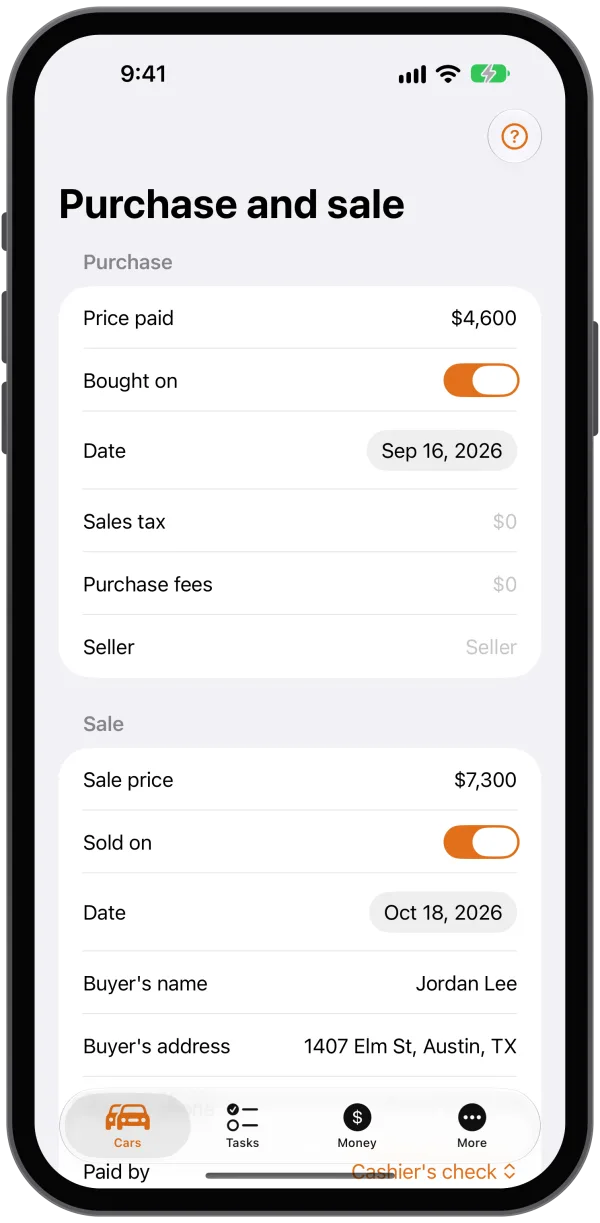
- Open the car and tap Purchase and sale.
- Under Purchase: Price paid, Bought on, Sales tax, Purchase fees and Seller.
- When it sells, under Sale: Sale price, Sold on, Buyer’s name, Buyer’s address, Buyer’s phone, Paid by and Mileage at sale.
- Tap Mark as sold if the car isn’t marked sold yet.
Result shows the total invested and, once sold, the profit, margin and return on investment.
Still stuck? In the app, go to More > Contact Support (it emails us with the error log attached; you see the email first), or email contact@setriksoftware.com. You can also browse the Help Center or the messages the app can show.