

Back up and export your data
Save everything to one file, restore it, or export spreadsheets.
Make a backup
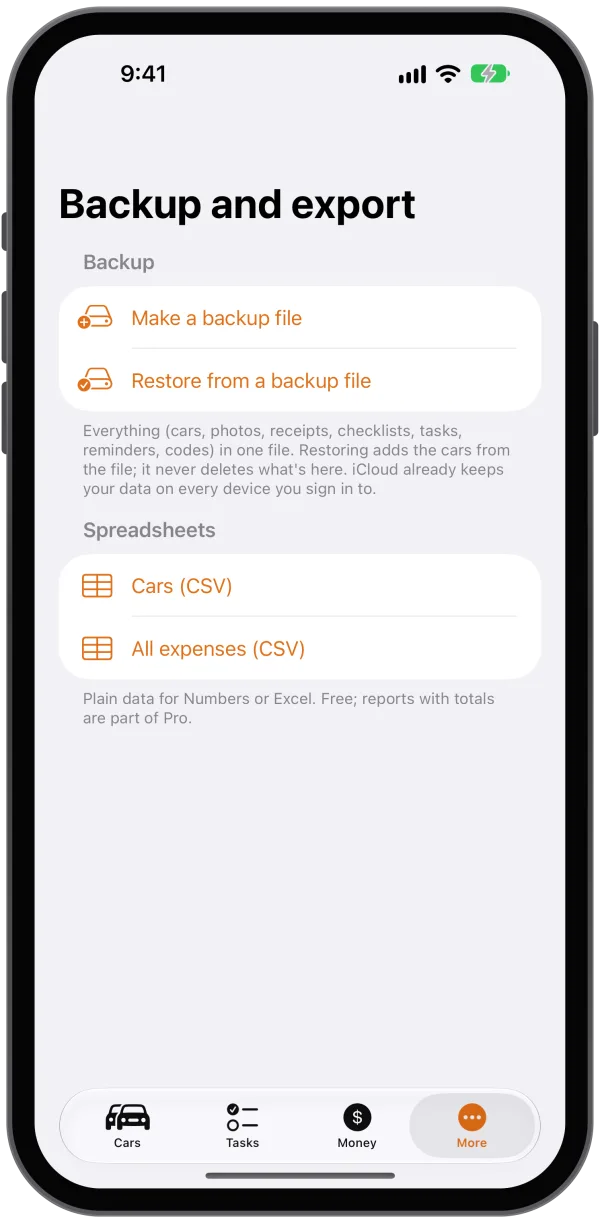
- Go to More > Backup and export.
- Tap Make a backup file, then Save or share the backup to put it in Files, email or another app.
The file has every car, photo, receipt, checklist, task, reminder and code.
Restore
Tap Restore from a backup file and pick the file. It adds the cars from the file; nothing already here is deleted.
Spreadsheets
Cars (CSV) and All expenses (CSV) export plain data for Numbers or Excel, free.
Still stuck? In the app, go to More > Contact Support (it emails us with the error log attached; you see the email first), or email contact@setriksoftware.com. You can also browse the Help Center or the messages the app can show.