

Enter guide values
Type trade-in and private party values from KBB or J.D. Power so Flip Binder can do the math.
Flip Binder doesn’t use paid value services. You look the car up (More > Resource guide has KBB, Edmunds and J.D. Power) and type what you find.
Steps
- Open the car and tap Values and maximum offer.
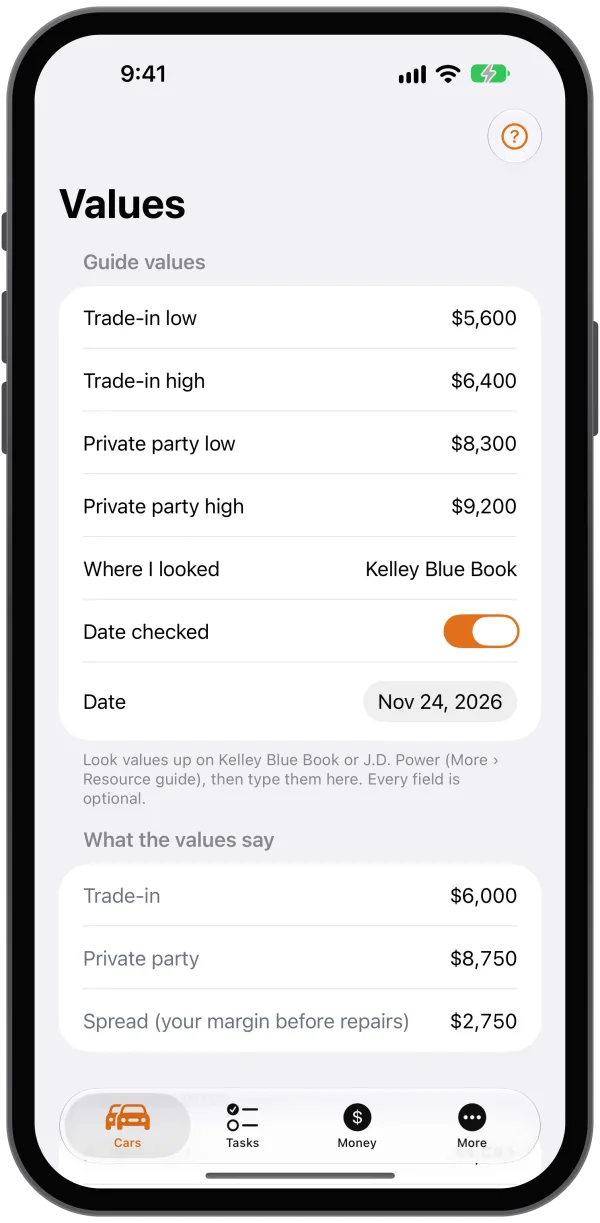
- Under Guide values, type any of Trade-in low, Trade-in high, Private party low and Private party high. Every field is optional.
- Optional: fill in Where I looked and turn on Date checked.
What the values say
- With a low and a high, Flip Binder uses the midpoint; with one, it uses that one.
- Spread (your margin before repairs): private party minus trade-in, when both are entered.
- Expected profit uses private party if entered, otherwise trade-in (“based on trade-in”).
- After you buy, you’ll see how far under (or over) trade-in you paid.
Still stuck? In the app, go to More > Contact Support (it emails us with the error log attached; you see the email first), or email contact@setriksoftware.com. You can also browse the Help Center or the messages the app can show.