

Write a listing
Asking price, title, description and highlights, written once for every site.
Steps
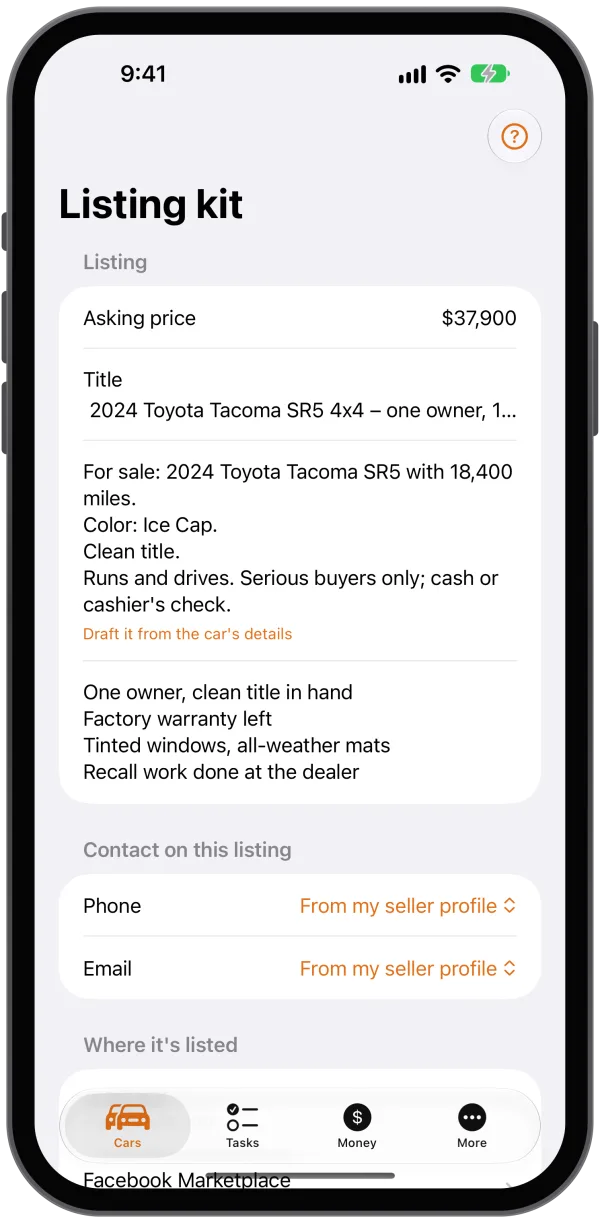
- Open the car and tap Listing kit.
- Type the Asking price and a Title (the car’s name is used if you leave it empty).
- Write the description, or tap Draft it from the car’s details and edit what it writes.
- Add highlights, one per line.
- Under Contact on this listing, choose for Phone and Email: From my seller profile, A different one for this car, or Don’t show.
Price drops and inquiries
Under Price drops and inquiries, type a New price and tap Save to record a drop (the asking price updates). Use Buyer inquiries to count people who reached out.
Writing the listing is free; sharing it, the ad image, flyer and shared page are Pro.
Still stuck? In the app, go to More > Contact Support (it emails us with the error log attached; you see the email first), or email contact@setriksoftware.com. You can also browse the Help Center or the messages the app can show.