Car flip expenses
Check it off, and the cost is counted
The $40 part and the $95 fee nobody added up are where flips lose money. In Flip Binder, tasks turn into expenses when you check them off, with the real price and the receipt, so every cost lands on the right car.
Tasks, expenses, receipts and hours are free.
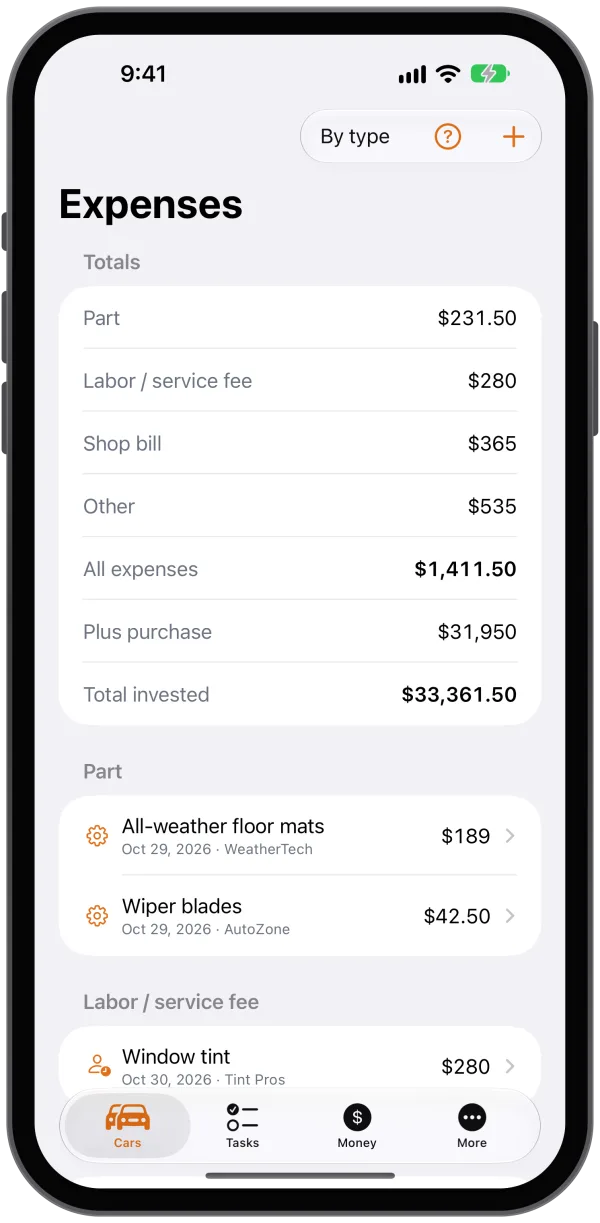
Totals by type, total invested and still to spend.

For iPhone and iPad · Requires iOS 26 or later · Free for every car
How it works
From task to expense
1
Add the task
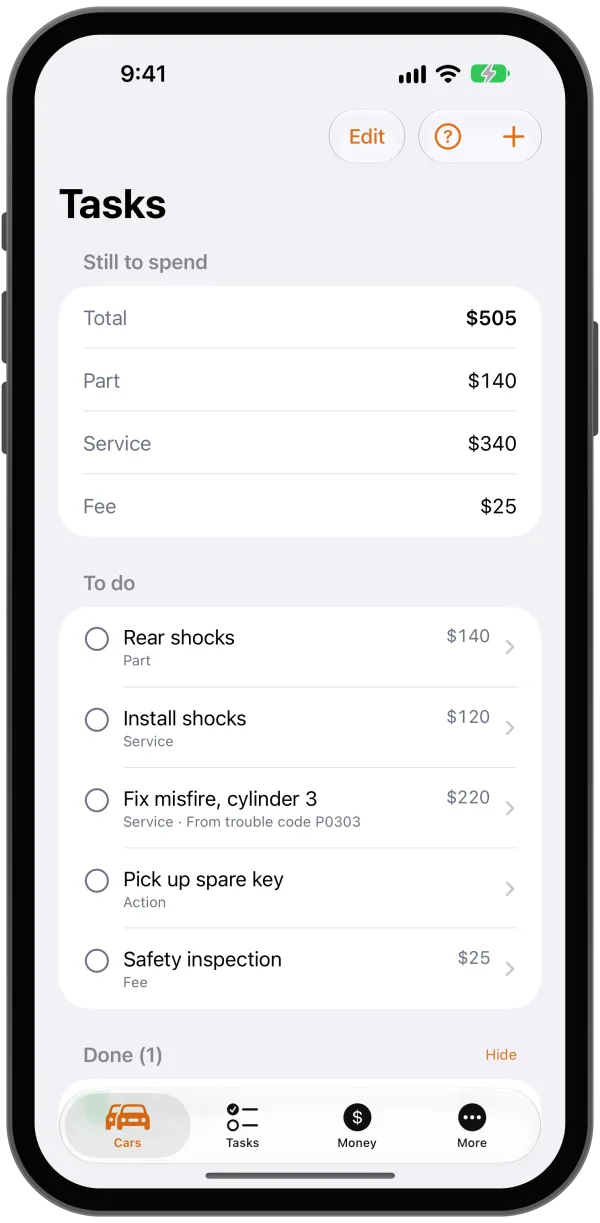
Title, type (Part, Service, Action or Fee) and an estimated cost. Tasks from the inspection, a recall or a code say where they came from.
2
Check it off
Type What it really cost (the estimate is filled in) and add a receipt photo if you like.
3
See the total
The expense is saved on the car. Still to spend goes down; total invested goes up.
Every expense, with the receipt
Car flip expenses, all in one place
Add any expense by hand too: a part, labor or a service fee, a shop bill, or anything else, with the vendor, the date and a receipt photo, camera shot or PDF.
Totals by type, plus the purchase price and the total invested.
Group by type or month; duplicate, or delete with Undo. Pricing a part first? RockAuto is in the resource guide.
Unchecking a task asks whether to remove its expense, so nothing counts twice.
Business expenses with no car (supplies, tools) count in period totals and overall profit, not in any car’s profit.
Every car’s to-do list
One list for every car
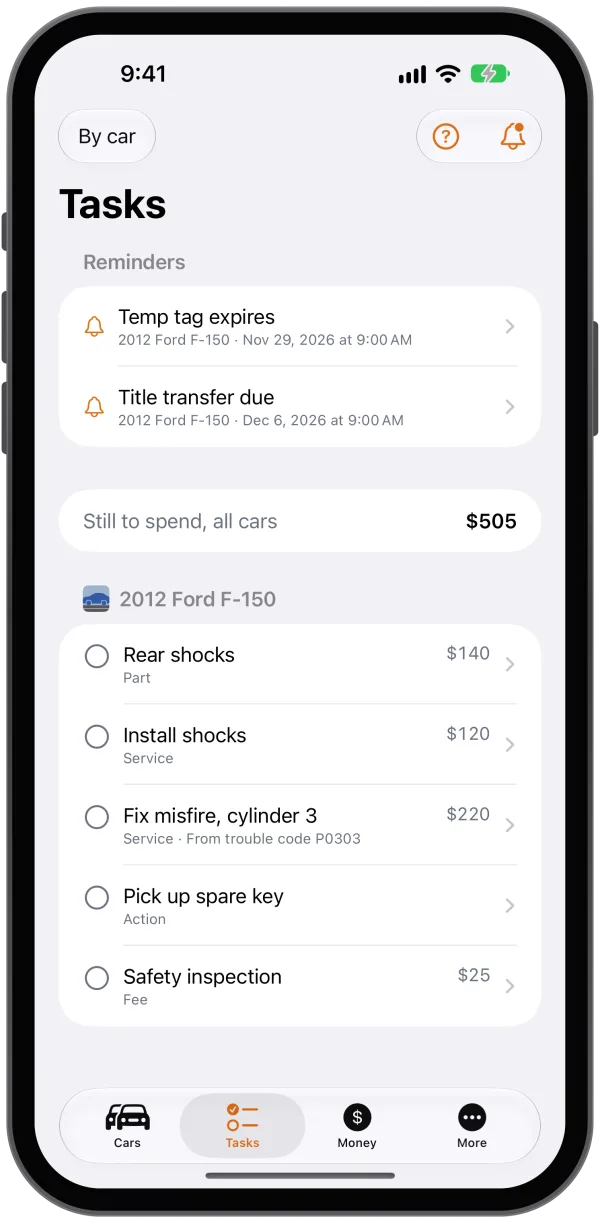
The Tasks tab shows every car’s open tasks, by car or by type, with reminders on top and what’s still to spend.
Reorder, search and hide done; swipe to delete with Undo.
My hours: log the hours you put in, and see profit per hour once it sells.
Good to know
Good to know
A part is saved as a Part expense, a service as Labor / service fee, a fee or an action as Other.
The expense report lists every car and business expense, by type and by car (Pro).
Free for every car
Tasks, expenses, receipts, business expenses and hours are free for every car. See Flip Binder free and Pro plans.
Keep exploring
More of what Flip Binder does
Or see every Flip Binder feature on one page.
Reminders
Temp tags and title transfers, and a nudge when a car has been listed, bought or a lead has gone quiet too long.
See remindersPhotos
Before, after and damage tags, captions and a cover photo for the listing, the ad image and the flyer.
See photosMaximum offer
Guide values you type in, minus repairs, fees and the profit you want: the most to pay, before you go.
See the maximum offerPre-purchase inspection
51 checks from the title to the test drive, with costs that lower your offer. Go, walk away or offer.
See the inspectionVIN scan and recalls
Scan the VIN and the car fills in. A mismatch warning, and the model year’s NHTSA recalls.
See VIN and recallsTrouble codes
Several codes at once, each Open, Came back or Fixed, so you see what’s really fixed.
See trouble codesQuestions about tasks and expenses
What happens when I check off a task?
For a part, service or fee, you type what it really cost and the expense is saved on the car. An action can be recorded as an expense if it cost something.
Which car flip expenses can I track?
Every kind of car flip expense: parts, labor or service fees, shop bills and anything else, each with the vendor, date and receipt.
Can I keep expenses that aren’t for one car?
Yes. Business expenses count in period totals and overall profit, but not in any car’s profit.
Can I get my expenses out?
Yes. A spreadsheet (CSV) of expenses is free from Backup and export.
Receipts in the glovebox again?
Snap the receipt, put it on the right car, and see what’s still to spend. Free.